
Stop Typing, Start Talking: Why 2026 is the Year AI Dictation Finally Goes Mainstream:
Why AI Dictation Apps Are Worth Your Attention in 2026:
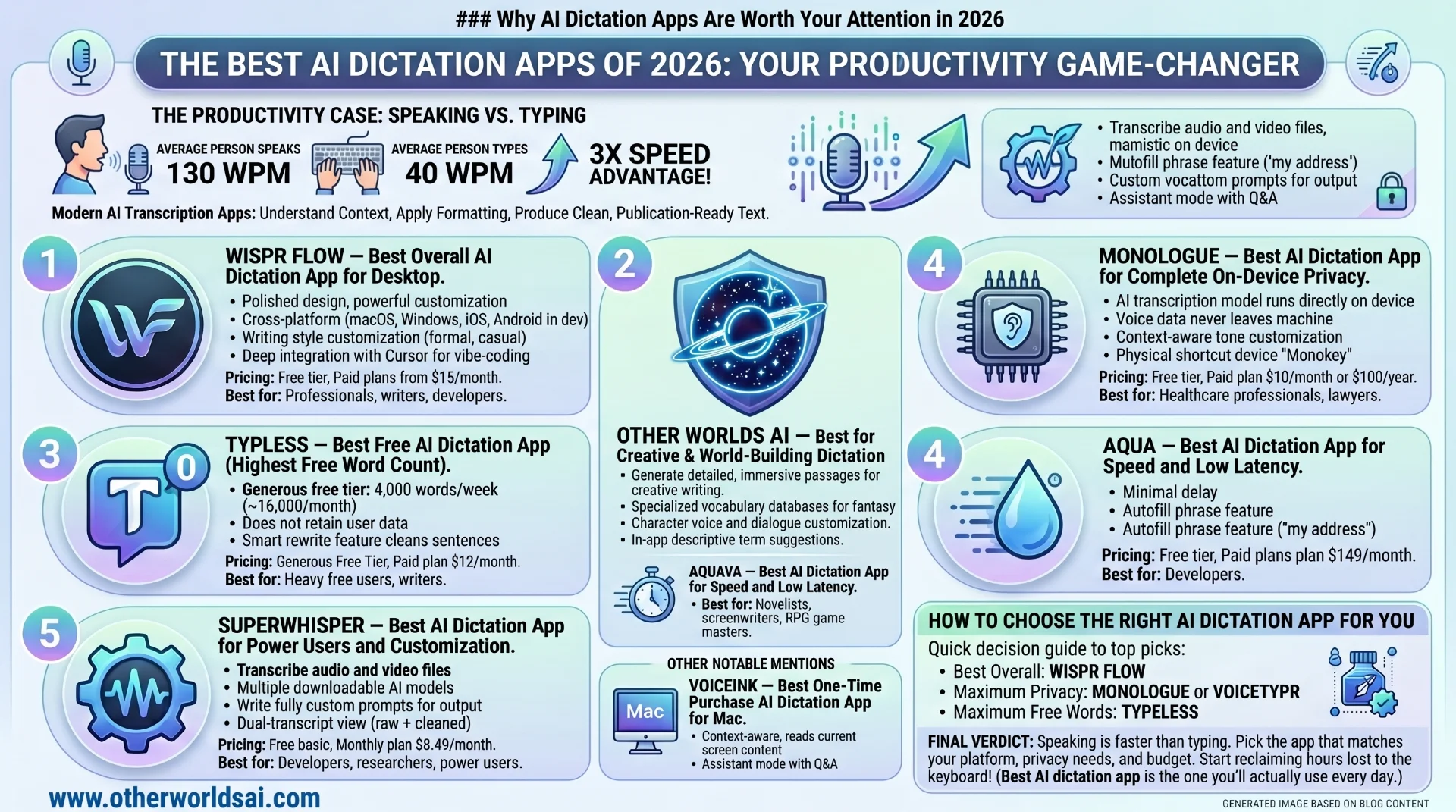
The productivity case for AI voice-to-text software has never been stronger. The average person speaks at roughly 130 words per minute, compared to a typing speed of around 40 words per minute. That's a 3x speed advantage before you even factor in the time saved on editing. Modern AI transcription apps don't just capture your words — they understand context, apply formatting, and produce clean, publication-ready text with minimal intervention.
From solo entrepreneurs drafting emails to developers narrating code comments, AI speech-to-text tools are quickly becoming an indispensable part of modern workflows. Here's our definitive ranking of the best options available today.
The Best AI Dictation Apps, Tested and Ranked:
-
- Wispr Flow — Best Overall AI Dictation App for Desktop:
Wispr Flow earns our top overall pick thanks to its polished design, powerful customization, and cross-platform availability. This well-funded AI dictation app supports macOS, Windows, and iOS — with an Android version actively in development — making it one of the most versatile voice typing tools on the market.
What truly sets Wispr Flow apartis its writing style customization engine. Users can choose between "formal," "casual," and "very casual" tones for different writing contexts — whether you're composing a professional email, a Slack message, or a personal note. Power users will also appreciate its deep integration with vibe-coding environments like Cursor, where the app can automatically recognize variables and tag files directly in chat.
Pricing:
-
Free tier: Up to 2,000 words per week on desktop; 1,000 words per month on iOS.
-
Paid plans: Start at $15/month for unlimited transcription.
Best for: Professionals, writers, and developers** who want a polished, fully-featured AI dictation tool.
-
- Willow — Best AI Dictation App for Privacy + Productivity:
Willow positions itself as the AI dictation app for people who hate typing — and it delivers on that promise in a genuinely innovative way. Beyond standard transcription and auto-formatting features, Willow uses large language models to generate complete, polished passages of text from just a few dictated words. Speak in shorthand; Willow fills in the rest.
Privacy-conscious users will find Willow's approach particularly reassuring. The app stores all transcripts locally on your device and offers a full opt-out from AI model training — a rare and welcome commitment in an era of data-hungry apps. Custom vocabulary support also makes it a strong choice for professionals in specialized fields like medicine, law, or technology.
Pricing:
-
Free tier: 2,000 words per month on desktop.
-
Paid plans:- Start at $15/month for unlimited dictation and personalized writing style memory.
-
Best for: Privacy-focused users and professionals who want AI-powered text expansion from minimal input.
-
- Typeless — Best Free AI Dictation App (Highest Free Word Count)
If you're looking for the most generous free AI transcription app on the market, Typeless wins by a wide margin. The app offers an extraordinary 4,000 words per week — approximately 16,000 words per month — on its free tier, dwarfing the competition. For casual users or those just getting started with voice typing, this alone makes it worth a serious look.
Beyond its generous free tier, Typeless also prioritizes user privacy, explicitly stating it does not retain user data or use it to train AI models. The app also includes a smart rewrite feature that cleans up fumbled or unclear sentences — handy for anyone who thinks faster than they speak. Available for Windows and macOS.
Pricing:
-
Free tier: 4,000 words/week (~16,000 words/month)
-
Paid plan: $12/month (billed annually) for unlimited words and early access to new features.
Best for: Heavy free users, writers, and anyone wanting maximum free voice-to-text output.
-
- Monologue — Best AI Dictation App for Complete On-Device Privacy.
For users who are serious about keeping their data completely off the cloud, Monologue is in a category of its own. The app lets you download its AI transcription model directly to your device, meaning your voice data never leaves your machine. This makes it an excellent choice for professionals in sensitive industries — healthcare, legal, finance — where data privacy isn't optional.
Monologue also offers context-aware tone customization, adapting its output style depending on which application you're using. Its most active users are even sent a physical shortcut device called the Monokey — a charming, tactile touch that sets it apart from purely software-based competitors.
Pricing:
-
Free tier: 1,000 words/month.
-
Paid plan: $10/month or $100/year.
Best for: Healthcare professionals, lawyers, and anyone who needs full offline AI transcription with zero cloud exposure.
-
- Superwhisper — Best AI Dictation App for Power Users and Customization:
Superwhisper is the power user's AI dictation tool of choice, offering a level of configurability that few competitors can match. Beyond standard voice typing, the app can transcribe from audio and video files, supports multiple downloadable AI models (including Nvidia's Parakeet speech-recognition models), and lets you write fully custom prompts to control exactly how your output is formatted.
The dual-transcript view is a standout feature — letting you see both the raw, unprocessed transcription and the cleaned-up final version side by side, directly from your system keyboard. This is invaluable for users who need to verify accuracy or understand what edits the AI has made.
Pricing:
-
Free: Basic voice-to-text + 15 minutes of Pro feature trial.
-
Monthly plan: $8.49/month.
-
Annual plan: $84.99/year.
-
Lifetime: $249.99 one-time payment.
Best for: Developers, researchers, and power users who want full control over AI transcription models and output.
-
- Aqua — Best AI Dictation App for Speed and Low Latency:
Speed is Aqua's signature feature — and it has the backing to prove it. This Y Combinator-funded voice typing app for Windows and macOS claims to be one of the fastest AI transcription tools available, minimizing the delay between when you speak and when text appears on screen. For anyone who has been frustrated by sluggish voice-to-text response times, Aqua is a breath of fresh air.
Aqua's autofill phrase feature is a genuinely clever productivity shortcut. Simply say "my address" or "my email signature" and Aqua automatically types the full saved text — an elegant solution for repetitive input. The app also offers its own speech-to-text API, allowing third-party developers to integrate Aqua's transcription engine into their own tools.
Pricing:
- Free tier: 1,000 words/month.
- Paid plans: Start at $8/month (billed annually), unlocking unlimited words and 800 custom dictionary values.
Best for: Users who prioritize low-latency transcription and smart text autofill shortcuts.
-
- VoiceInk — Best One-Time Purchase AI Dictation App for Mac.
VoiceInk is a context-aware, open-source private dictation app built exclusively for Mac — and it's one of the smartest tools in this roundup. The app reads the content currently on your screen and automatically adjusts its transcription output to match the context. Writing in a code editor? It formats accordingly.
Composing an email? It adapts to that too.The app's per-app customization is particularly impressive, letting you set specific formatting rules and output styles for individual applications or URLs. An assistant mode adds another dimension, allowing VoiceInk to answer questions in addition to transcribing. At a one-time price with no subscription, it offers outstanding long-term value.
Pricing (one-time lifetime license):
-
1 device: $25 | 2 devices: $39 | 3 devices: $49
-
Best for: Mac users who want a smart, context-aware dictation tool with a one-time payment and no ongoing subscription.
-
- VoiceTypr — Best Offline AI Dictation App with No Subscription.
VoiceTypr takes a principled stand against the subscription model — and for many users, that alone makes it worth serious consideration. This offline-first voice typing app supports local AI models for fully private transcription, works across both Mac and Windows, and supports over 99 languages — making it one of the most linguistically versatile tools in this roundup.
For technically minded users, VoiceTypr's open-source GitHub repository offers the option to self-host and run your own instance of the software. After a three-day free trial, the app is available as a one-time lifetime purchase — a refreshing alternative in a market dominated by monthly subscriptions.
Pricing (lifetime license):
1 device: $35 | 2 devices: $56 | 4 devices: $98
Best for: Multilingual users, privacy advocates, and developers who want an offline, open-source voice typing solution.
-
- Dictato — Best Ultra-Fast AI Dictation App for Mac (80ms Latency)
If speed is a priority and you're on Mac, Dictato deserves a spot on your shortlist. This lightweight dictation tool leverages offline models — including Parakeet, Whisper, and Apple's own Speech Analyzer — alongside Apple Intelligence for filler word removal and light text processing. The result is a claimed latency of just 80 milliseconds, meaning text appears on screen almost the instant you finish speaking.
At a one-time price of €9.99 (approximately $12), Dictato includes two years of feature updates — making it an exceptional value for Mac users who want near-instant AI voice transcription without any cloud dependency or ongoing subscription fees.
Pricing:
One-time: €9.99 (~$12) with two years of feature updates included.
Best for: Mac users who want the fastest possible local AI dictation at an unbeatable price.
10.- AudioPen — Best AI Dictation App for Voice Notes and Cross-Platform Audio:
AudioPen started life as a web-based voice notes app and has grown into something more versatile and powerful. Its Mac desktop version now offers live AI transcription alongside a robust suite of audio management features: store voice notes across platforms, combine multiple notes into summaries, upload existing audio files for transcription, and rewrite content using AI-powered style transformation — all from a single app.
The ability to switch between writing styles at any time gives AudioPen unusual flexibility for content creators, journalists, and note-takers who need their transcriptions to serve different purposes across different contexts.
Pricing:
3 months: $33 | 1 year: $99 | 2 years: $159
Best for: Content creators, journalists, and podcast-style note-takers who want powerful cross-platform audio and transcription management.
- -Handy — Best Free Open-Source AI Dictation App (Zero Cost).
Not every workflow demands a premium AI transcription tool — and for users who simply want to dip their toes into voice typing without spending a cent, Handy is the answer. This open-source, completely free dictation tool runs on Mac, Windows, and Linux, making it one of the only truly cross-platform options in this roundup.
Handy is deliberately minimal — there's no sophisticated AI rewriting, no style customization, no subscription tiers to navigate. What it does offer is reliable push-to-talk transcription with a configurable hotkey. Sometimes simple is exactly what you need.
Pricing:
Free: Completely free and open source, forever.
Best for: Budget-conscious users, Linux users, and anyone who wants a no-frills introduction to AI voice typing.
How to Choose the Right AI Dictation App for You:
With so many strong options available, choosing the best AI speech-to-text app for your needs comes down to a few key factors. Here's a quick decision guide:
-
You want the best overall experience: Wispr Flow.
-
You need maximum privacy with on-device processing: Monologue or VoiceTypr.
-
You want the most generous free tier: Typeless (16,000 words/month free).
-
You're a Mac user who wants a one-time payment: VoiceInk or Dictato.
-
You want maximum power and customization: Superwhisper.
-
Speed and low latency are your priority: Aqua or Dictato.
-
You want cross-platform audio and note management: AudioPen.
-
You need a completely free option: Handy.
Final Verdict: The Future of AI Voice Typing Is Already Here:
The AI dictation app market has matured remarkably fast — and the options available today are genuinely impressive. Whether you need a cloud-powered transcription engine that rewrites your words with professional polish, a fully offline local model that keeps your data locked on your device, or simply a free tool to explore voice typing for the first time, there has never been a better moment to make the switch.
The bottom line is simple: speaking is faster than typing, and today's best AI speech recognition software is accurate enough to make voice your primary input method. Pick the app that matches your platform, privacy needs, and budget — and start reclaiming the hours you've been losing to your keyboard.
The best AI dictation app isn't the one with the most features — it's the one you'll actually use every day.